

Presentation
A deck with the lecture's own figures on it, in the order you will say them.
M51loop12 s
The presentation board walked through: the lecture dropped into its tile, a design picked in the dials, the slides set, Create pressed and the first slides sliding in
screen capture of the board itself, the pointer visible, 3 s a step
- 1Pick the lectureFrom your shelf, with a cover if you have one
- 2Choose a designTheme, layout and how much goes on a slide
- 3Set the slidesHow many, the sheet, the language
- 4Create, then edit by askingEvery slide answers to the same composer
1 / 4
Full guideStart creating
Use a ready template, or start from a lecture on your shelf
New
Section walkthrough
Revision deck
Exam-night summary
Featured templates
Seminar talk

Case presentation
On the boardMechanism, step by step
Journal club
Projects
You have no saved projects — nothing can be saved until Create runs. Open a sample below to read a deck through.
Explore the inside of every project

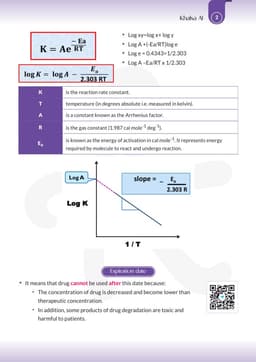
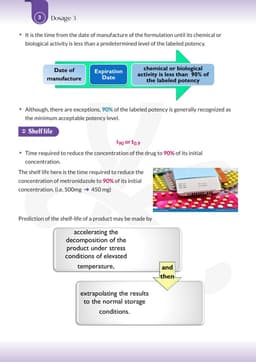
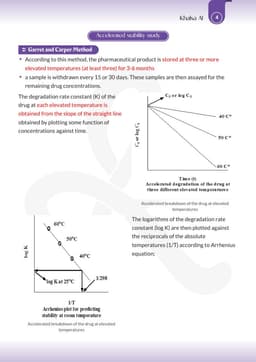
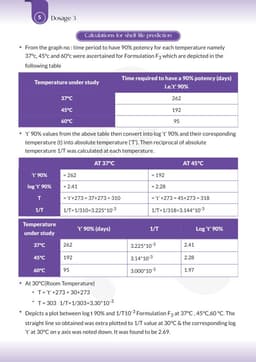 Stability Kinetics · PresentationSlides you can stand up and presentOpen
M31still
Stability Kinetics · PosterOne sheet that says the whole thingOpenSample project: lecture 18 as one A2 poster, seen whole
the poster made from lecture 18's pages; flat vector on the subject's night colour, no faces
M32still
Stability Kinetics · PaperThe written assignment, sourcedOpenNew projectSample project: lecture 18 as an A4 paper — its title page beside page 2, a sourced claim marked
the printed-sheet look — white paper, Inter, one red rule in the head